Order Management
New Search Filters in Order Search
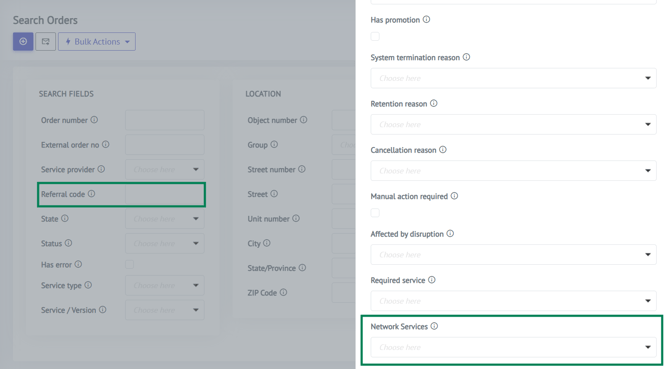
Two new filters have been added to the Order Search:
- Referral Code – available in the standard search fields, filter and search Orders by Referral Code. The field is only visible if Referrals is enabled.
- Network Service – available in Advanced Search, filter Orders by Network Service to easily find all orders sharing the same type of service, without relying on the Service or Service Type filters.
Deployment
FSM - Create Unscheduled Work Orders from BE Admin Portal
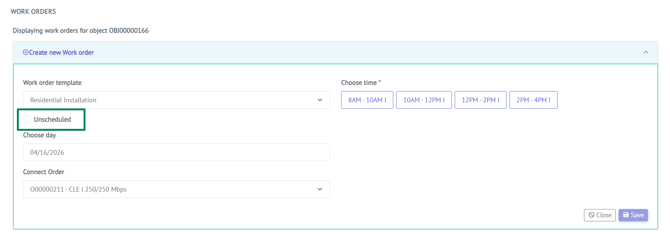
Admin users using COS FSM can now create Work Orders in an unscheduled and unassigned state. Previously, scheduling and vendor assignment were required at the time of creation. This change supports operational workflows where scheduling is determined at a later stage, without blocking the initial record creation.
The unscheduled option is template-controlled — it can only be used when the selected Work Order template explicitly allows it.
Addresses & Objects
"Allow Signup" Flag No Longer Reset on Status Change
The Allow Signup flag on Objects is no longer automatically modified when an Object's status changes (e.g. from Not Deliverable to In-Deployment or Deliverable). Previously, status transitions could unintentionally update the availability to sign up on the Object. The flag now has to be managed manually, giving operators full control over the signup flow for each Object.
Change Addon Options (Channels)
It is now possible to change Addon Options directly on an active order. Addon Options are selectable items within an addon — for example, individual TV channels within a TV package.
Previously, changing selected options after initial setup required manual workarounds. Operators can now swap options directly on the addon page, making it easier to adjust a customer's selection without having to remove and re-add the addon. Read more here.
API Improvements
Set and Update Object Number via API
It is now possible to both set and update an Object's Object Number through the API. Previously this had to be handled manually in the Admin UI, which blocked integrations that need to manage object identifiers programmatically.
Metadata Fields Supported in Customer Create API
The Customer/Create API endpoint now accepts metadata fields, bringing it in line with Customer/Update and Order Create. This was previously only supported on update, requiring a two-step process for integrations that needed to store metadata at creation time.
Email Deactivation Fields Available in Customer API
The EmailDeactivated and DeactivateEmailUntil fields can now be set and updated via both the Customer Create and Customer Update API endpoints. Previously these fields could only be managed through the Admin UI. This enables integrations to control email delivery behavior programmatically from the start.
Handle Addon Options in Bundled Addons via API
The API now supports managing options within bundled addons, making it possible to handle complex addon configurations programmatically rather than only through the Admin UI.
Billing
"Wholesale Invoice Data" – Renamed Menu Item
The Invoices menu item and related UI labels have been renamed to Wholesale Invoice Data to more accurately reflect the purpose of the page — which provides billing data only, without invoice generation or automated billing. This is a UI terminology update only; no underlying functionality, routes, or permissions have changed.
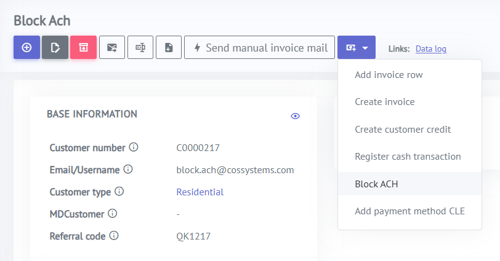
Block ACH Payment Method per Customer
This information applies only when end-customer billing is enabled.
Operators can now block a specific customer from using ACH after repeated ACH returns. When ACH is blocked:
- The customer cannot register ACH as a payment method — ACH is hidden in the Marketplace/Customer Portal.
- No ACH payments can be processed in the backend.
- Existing ACH payment data (bank accounts/mandates) is removed from Stripe.
The feature is controlled via a new customer-level setting, Ach Blocked. Unblocking the customer restores ACH availability subject to normal eligibility rules.
Integrations
IQGeo Integration
A new integration with IQGeo has been completed. IQGeo is a network infrastructure management platform and a key competitor to Vetro. This integration opens up new opportunities for operators managing their network data in IQGeo to connect with COS Business Engine. Read more here.
User Experience
Password Visibility Toggle in Login and Customer Portal
A password visibility toggle (eye icon) has been added to password input fields, allowing users to switch between hidden and visible text. The feature is available in:
- The Login pop-up
- The Change Password page in the Customer Portal