
This applies if you bill end customers through Business Engine
Invoice billing and statement billing side by side
|
Invoice billing |
Statement billing |
|
|---|---|---|
|
What the customer receives |
One invoice per billing period |
One statement per billing period |
|
What it shows |
The charges for that period |
Opening balance, the period's activity and closing balance |
|
What the customer pays |
Each invoice in full |
Any amount, from a minimum you set |
|
Overpayments |
Credit on the account |
Applied to future charges automatically |
|
Billing day, due date and auto-pay |
Your billing settings |
The same billing settings |
What your customers see
A statement works like a bank statement. It starts with the balance carried over from the previous statement, lists everything that happened during the period, and ends with the closing balance and the amount due. Charges that are not yet due are shown in grey so the customer knows what is coming, but they are not counted in the amount due.
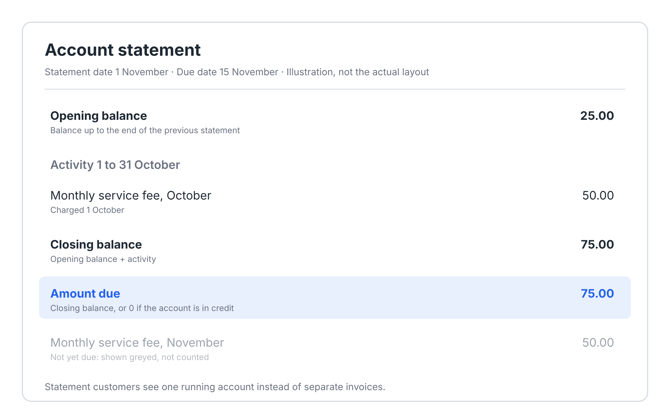 In the customer portal, customers can also pick a date and see their account as it was on that day. Statement customers never see the word invoice or any invoice numbers.
When statements are created and paid
Statements are created on the customer's normal billing day and follow the billing settings you already use for invoices.
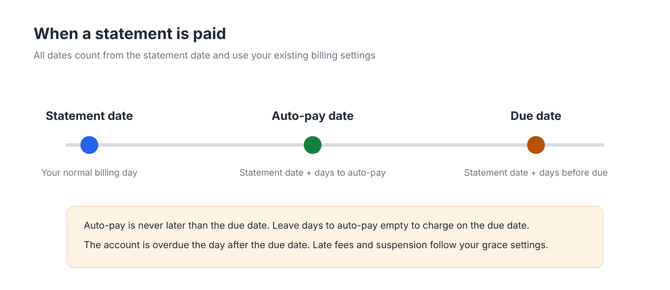
- Statement date: the customer's normal billing day.
- Due date: the statement date plus your days before due. The first statement uses the same rule as a customer's first invoice.
- Auto-pay date: the statement date plus your days to auto-pay, never later than the due date. If the setting is empty, the customer is charged on the due date. Auto-pay always charges the amount due.
- A statement is sent whenever the balance is not zero, even if nothing happened during the period. If the amount due is below your minimum amount, the statement is still sent, but the automatic payment waits until the amount reaches the minimum.
Balance, amount due, overdue and not yet billed
Your team sees four figures for every statement customer:
- Balance: everything the customer owes or has in credit right now.
- Amount due: what the customer needs to pay by the due date. It is the closing balance, or 0 if the account is in credit.
- Overdue: charges from earlier periods that are past their due date and not yet paid.
- Not yet billed: charges that will appear on the next statement.
Payments and overpayments
Customers can pay the amount that suits them, from a minimum amount that you set. Anything they pay above the amount due is applied to their next charges automatically. Automatic payments work just as they do for invoice customers.
Late payments
An account is overdue the day after the due date. Your grace settings decide when late fees and suspension follow, so they work the same way as for invoice customers.
If a customer promises to pay by a certain date, your support team can set a hold date on the customer. Until that date, no late fee or suspension is applied. The hold ends by itself when the date has passed.
The ledger view and Excel export
The customer page has a ledger view of the account. Pick any date to see the balance and every transaction up to that day, and export the view to Excel when you need to share or reconcile it.
Get started
- Decide which customer types should use statement billing.
- Check your billing settings for those customer types: billing day, days before due, days to auto-pay and minimum amount.
- Contact COS support. We set up statement billing for the customer types you choose, and help you move existing customers over.