Overview
Previously, a non-default contract fully replaced the Default contract's price, so only one could be active at a time and promotions could not be combined. With Delta pricing, a non-default contract instead stores an amount relative to the Default price.
Delta pricing is a feature that must be enabled by COS. It is off by default. Contact COS support or your Customer Success Manager to have it turned on.
Stacking multiple promotions
Delta contracts can overlap and stack additively, so several promotions can run on the same order at once, for example a 6 month promotion combined with a temporary referral credit.
Percent based discounts are converted to a fixed amount at the moment the contract is created.
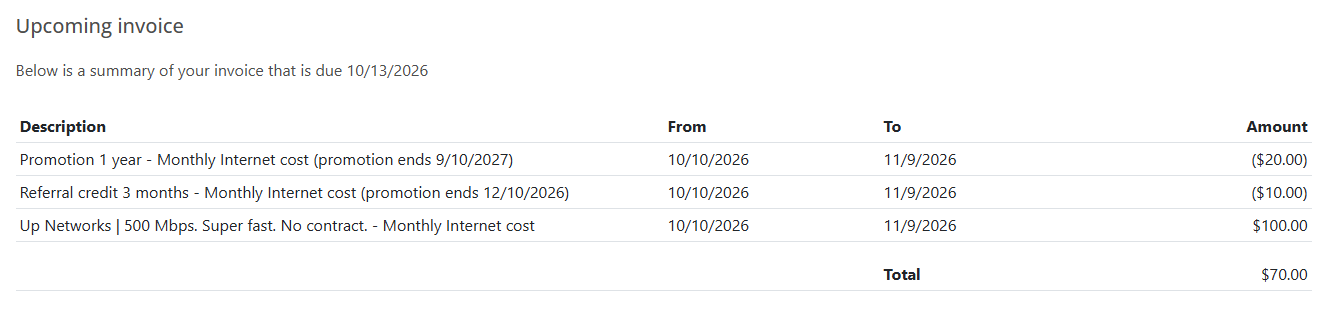
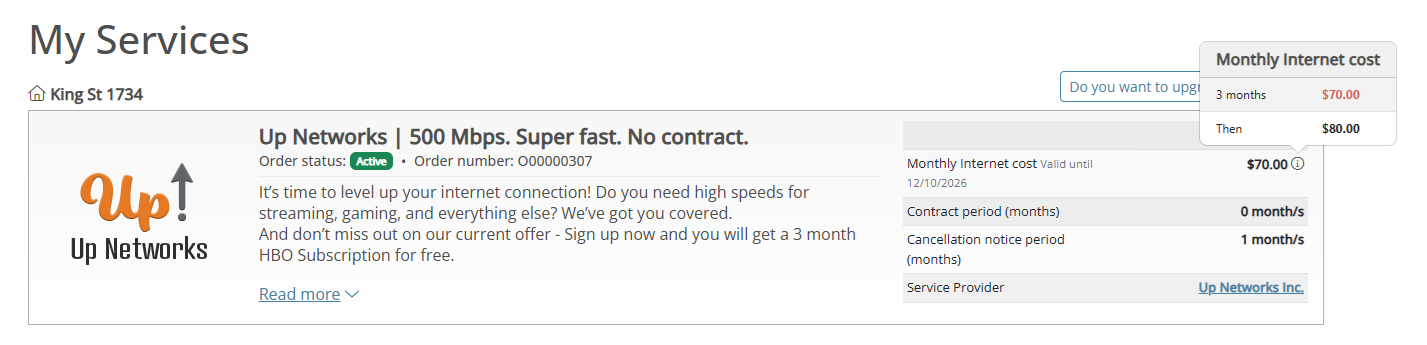
Example: a Default price of 100, with a running promotion of -20 and a 3 month referral credit of -10, gives a price of 70 during the overlap and 80 for the rest of the promotion.

Legacy contracts
Orders with older Adjustment contracts are automatically converted to Delta contracts the next time a contract is written to that order. No manual migration is needed.
Invoicing
Invoices show the Default price as a full price row, plus one row per active Delta contract. Delta rows can be negative. Orders using only the legacy model are invoiced as before.
Customer portal
Customers see their current monthly price, plus a preview of any upcoming price change and when it takes effect, based on active Delta contracts.
Partner API
AddOrderContract and UpdateOrderContract are deprecated. Integrators should move to the new AddOrderDeltaContract and UpdateOrderDeltaContract endpoints, which take signed delta values directly.
GET requests now include a Type field (Default, Adjustment, or Delta).
CreateOrder still accepts absolute prices in both modes, converting them to deltas when the feature is enabled, so existing integrations are unaffected.
Integrator note: GetActiveCustomerOrderContracts can return contracts with a signed delta as Price. Check the Type field to interpret it correctly.
If you would like to enable stacked promotions, or have questions about how they affect a specific order, please contact COS support or your Customer Success Manager.