A Promotion Delay postpones a promotional monthly recurring price by a chosen number of months. The delay applies only to the promotion period and lets you define prices that start later during the promotion.
Example:
If a promotion is valid for 3 months, you can set:
-
Month 1: Price A
-
Month 2: Price B
- Month 3: Price C
Prerequisites
Promotion Delay is an optional feature that must be enabled by COS.
Please contact COS Support if you want this setting activated in your environment.
Rules and limitations
-
Delay only applies to monthly recurring prices.
Start fees cannot be delayed. -
Only monthly promotions support delay.
Due-date promotions do not. -
Delay must fit inside the promotion period.
If a promotion lasts 6 months, the maximum delay is 5 months.
(A delayed price cannot begin after the promotion ends.)-
Month 1: Promotional price
-
Month 2: Ordinary price
-
Month 3: Promotional price again
Normal price periods inside a promotion are allowed.
If you configure a promotional price that is identical to the ordinary price, it will not be treated as a promotion price.
This enables “gaps” such as:
-
How it appears in the Marketplace
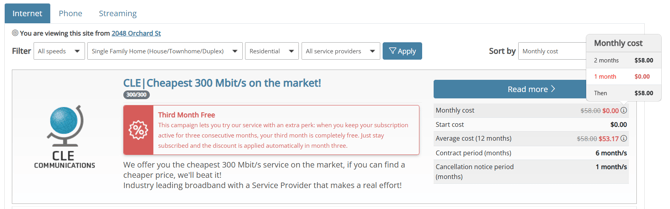
To make stepped pricing clearer, the portal now shows full period breakdowns:
-
Average Price tooltip/popup
Shows all periods and their prices instead of a single average. -
Monthly cost price popup (with promotion)
Shows a period-by-period breakdown instead of only stating the promotion length.
How pricing is stored
When a promotion includes delayed monthly
prices, the system automatically creates multiple order contracts.
Example:
Promotion valid for 3 months with stepped prices → contracts created:
-
1 default contract (ordinary price)
-
3 promotional contracts (one per month)
So you get 4 order contracts total.
This is expected and ensures billing matches the setup.
How to set up delayed discounts in the Administration Portal
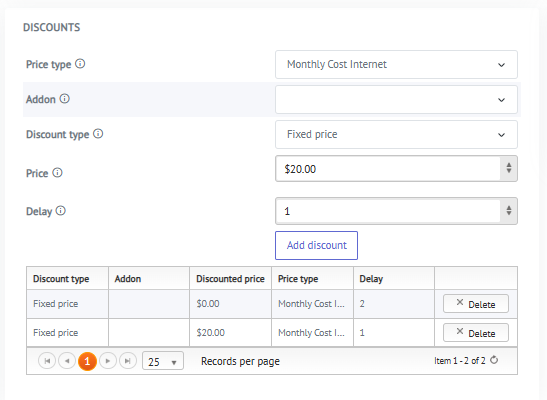
If the Promotion Delay feature is enabled in your system, a Delay field will appear when you manage Discounts for your promotions.
You can apply a delay to Monthly price types.
-
Go to your promotion and add a Discount.
-
Under Price type, select a Monthly price type.
- Delay = the number of months the discount is postponed.
-
A delay of
0means the discount applies immediately in the first month of the promotion.
-
Examples
-
$20 discount in the second month: set Delay = 1
(The discount starts one month after the promotion begins.) -
Free third month: set Delay = 2
(The discount starts two months after the promotion begins.)
You can add multiple monthly discounts with different delays to create stepped pricing across the promotion period.