
This article applies to environments outside North America. Using an environment in North America? See here.
Three APIs, two of them here to stay
| API | Status |
|---|---|
| Legacy API (separate URLs per provider and per API) | Phased out on December 31, 2026 |
| New API v1 | Fully supported, but no new features will be added |
| New API v2 | Fully supported, and all new features are added here. Recommended for new integrations |
Why we’re making this change
-
One URL for everything. In the legacy API, partner, NOC and deploy operations each had their own endpoint. The new API puts all calls under a single base URL, which makes your integration simpler. You can filter the endpoints by key type in the documentation.
-
Always up to date. The API is versioned together with Business Engine, so it always matches your installation. It can’t fall behind, and it needs no separate updates or maintenance.
-
Modern, secure and performant. It’s built on a newer foundation, with stronger security standards and better overall performance.
-
Simpler administration. Managing API keys and versions is easier.
API v1 and v2: what’s the difference?
The new API comes in two versions. v1 and v2 cover the same functionality, but v2 follows modern REST conventions and is where all new features will be added.
v2 is not a drop-in replacement for v1. Routes and response formats have changed, so you can’t move an integration to v2 just by changing the version in the URL. If you decide to move an integration from v1 to v2, review your API calls first (see step 4 below).
| v1 | v2 | |
|---|---|---|
| New features | Not added | All new features are added here |
| Routes | The action is part of the URL path | RESTful routes based on resource and HTTP method, for example POST /api/v2/orders and POST /api/v2/orders/{id}/cancel |
| Response format | Varies by endpoint | Always application/json |
| Dates | Unix timestamps | ISO 8601 in UTC (Unix timestamps are still accepted on input) |
| Lists | Full result set | Cursor based pagination: { data, hasMore, nextCursor }, with a separate /count endpoint for totals |
| Errors | Varies by endpoint | Standard RFC 7807 error body with type, title and status |
| HTTP status codes | Fewer, more general codes | More precise codes (for example 404 for not found and 409 for conflicts) |
| Retrying writes | Not supported | Send an Idempotency-Key header so a retried request is never processed twice |
| Request tracing | Not supported | Send an X-Correlation-Id header and we return it in the response |
What stays the same: the base URL, your API key, the BusinessEngine header and the fields in your requests. No v1 fields have been removed.
Which version should you use? v1 and v2 will always work side by side, and v1 will not be phased out. Your existing v1 integrations will keep working as they do today. However, new features will only be added to v2. If you need a new feature, or you’re building a new integration, use v2. You can also use both and move one integration at a time.
What you need to do
1. Update your base URL
In the legacy API, each service provider had its own unique URL, and in some cases a separate URL per API (for example https://provider.eu.noc.partnerapi.net and https://provider.eu.deploy.partnerapi.net).
In the new API, every provider uses the same base URL. Only test and production differ. Replace your existing endpoint URL(s) with the one for your environment:
| Environment | Base URL |
|---|---|
| Test | https://test.eu.partnerapi.net |
| Production | https://prod.eu.partnerapi.net |
The base URL is the same for v1 and v2.
2. Generate a new API key
If you’re a service provider, ask your Operator to generate a key for you. You’re also welcome to contact COS support for help.
If you’re an operator, you can generate the key yourself in BE Admin as a Co SuperAdmin, or contact COS support for help:
- Log in to Business Engine Admin and go to Users.
- Search for your API user. Usernames usually start with “partner”, so you can search for “partner*” in the username field.
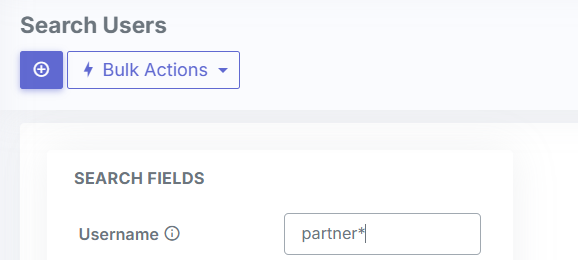
- Open the user and click “Generate partner API key”.

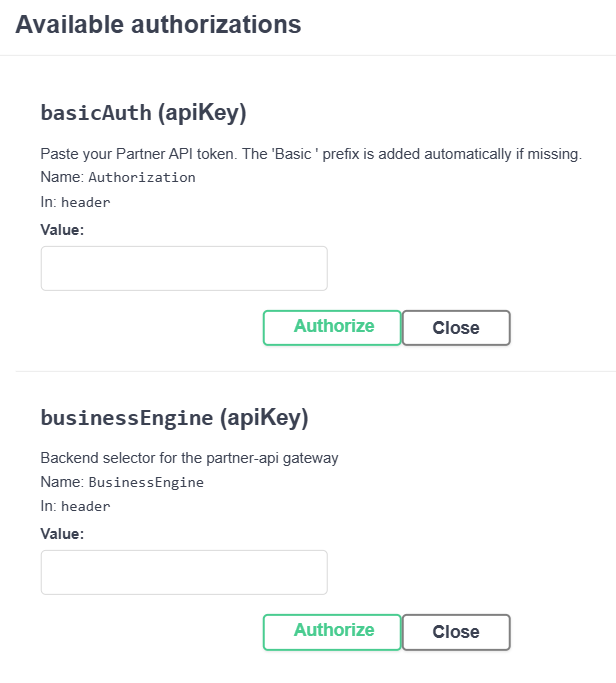
- Copy the key and use it in the basicAuth header.
Also include the BusinessEngine header in your requests to say which environment you’re targeting, same as today. The same API key and headers work for both v1 and v2.
3. Select the correct version in the API documentation
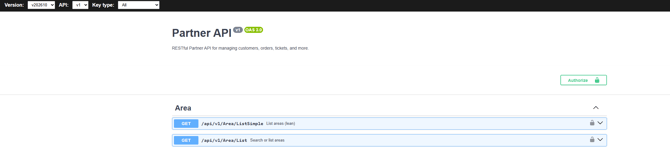
At the top of the API documentation page there are three selectors:
- Version: Choose the version that matches your BE installation, for example v202610.
- API: Choose v1 or v2, depending on which API version your integration uses.
- Key type: Filter the endpoints by the type of API key you use. The options match the separate legacy APIs you may have used before:
- Service Provider: endpoints available to service provider keys
- Deployment: endpoints for deployment operations
- NOC: endpoints for NOC operations
You can find your current BE version number in the bottom right corner when you’re logged in to the BE Administration Portal.

4. If you move to v2, review your API calls
Before you move an integration from v1 to v2, go through each call it makes and check the following:
- Routes: Update every endpoint to its v2 route. Switch the API selector to v2 in the documentation to see the v2 routes.
- Dates: Make sure your code can read ISO 8601 dates in responses.
- Lists: Use
nextCursorto fetch the next page untilhasMoreis false. Don’t assume a list returns every record in one response. - Error handling: Read the RFC 7807 error body, and check that your code handles the new HTTP status codes.
- Writes: Add an
Idempotency-Keyheader to create and update requests so retries are safe. - Test first: Run your updated integration against the test environment before switching production.
If you’d like help mapping your v1 calls to v2, contact COS support. When you report an issue, include your X-Correlation-Id so we can find the request quickly.
Transition period
The legacy API will remain available in parallel until December 31, 2026, so you won’t have any service interruption. After that date, only the new API (v1 and v2) will be available. Please migrate from the legacy API as soon as possible.
Moving from the legacy API to v1 is the smallest change. Moving straight to v2 takes a bit more work, but it gives you access to all new features going forward, since new features are only added to v2.
Questions?
Contact us at support@cossystems.com