
Purpose
Automatic suspension is designed to:
-
Reduce manual handling by Support and Operations
-
Lower financial risk caused by overdue payments
-
Ensure fair and consistent enforcement of billing policies
By automating these actions, operators can maintain better financial control while minimizing operational overhead.
How Automatic Suspension Works
When enabled, the system continuously evaluates customer payment status:
-
Customers with overdue payments are automatically suspended once the configured grace period has passed
-
Suspension follows the standard suspension flow used elsewhere in the system
-
When a customer’s balance reaches zero, reactivation is handled automatically using the existing reactivation flow
This ensures a predictable and auditable lifecycle for suspended services.
Configuration Settings
The following system settings control automatic suspension behavior:
-
Auto suspend delinquent customers
Enables or disables automatic suspension for overdue payments. -
Billing days from due to auto suspension
Defines the number of days after the payment due date before a customer is automatically suspended.
These settings allow operators to align enforcement with their billing policies and regulatory requirements.
NOTE – Days parked order setting
The Days parked order setting controls how many days an automatically parked order will remain in parked status before it is automatically canceled.
If this value is set too low, orders related to suspended customers may be automatically canceled instead of remaining parked until the customer is reactivated.
For operators using automatic suspension, it is strongly recommended to configure this setting with a sufficiently high value. This ensures that orders are not prematurely canceled while a customer is temporarily suspended due to overdue payment.
Customer Exclusions
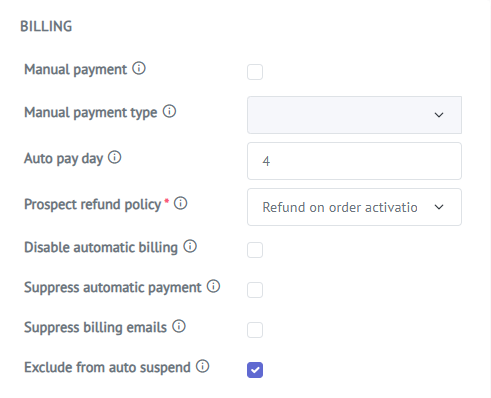
Individual customers can be excluded from the automatic suspension process. This allows operators to handle special cases, such as:
-
Key accounts
-
Contractual exceptions
-
Temporary payment arrangements
Excluded customers are not affected by automated suspension, but can still be managed manually if needed.
Automatic Reactivation
Once an overdue balance is fully paid and the customer’s balance reaches zero:
-
The system automatically reactivates the customer
-
No manual intervention is required
-
Standard reactivation logic is applied to ensure consistency
This creates a seamless transition back to active service once payment obligations are fulfilled.
Summary
Automatic suspension for non-paying customers provides a structured and reliable way to manage overdue accounts. By combining configurable rules, customer-level exclusions, and automated reactivation, the system reduces manual effort, limits financial exposure, and ensures consistent application of billing policies across the customer base.