
Purpose
Service Terms for add-ons are designed to:
-
Ensure legal compliance for regulated services such as VoIP
-
Require explicit customer acceptance of contractual terms
-
Prevent orders from being placed without proper consent
This provides clear documentation of customer agreement while reducing legal and compliance risks.
How Service Terms for Add-ons Work
When one or more selected add-ons have Service Terms configured:
-
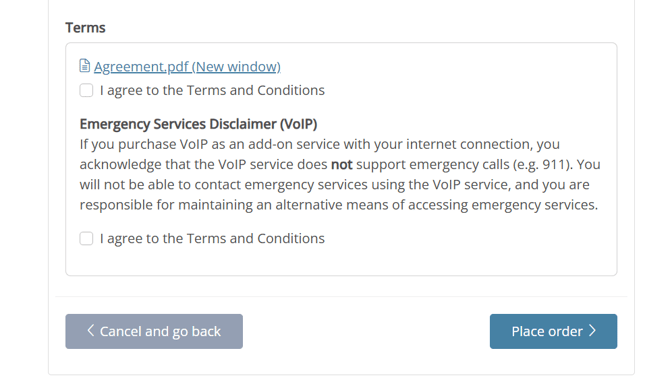
A mandatory Service Terms acceptance checkbox is displayed during checkout
-
The checkbox is shown only if at least one selected add-on includes Service Terms
-
Customers must actively accept the terms to proceed
-
Orders cannot be placed until the terms are accepted
If no selected add-ons have Service Terms configured, no additional acceptance step is shown.
How to Set Up Service Terms for an Add-on
Service Terms are configured directly on the add-on itself:
-
Open the Service where the add-on is defined
-
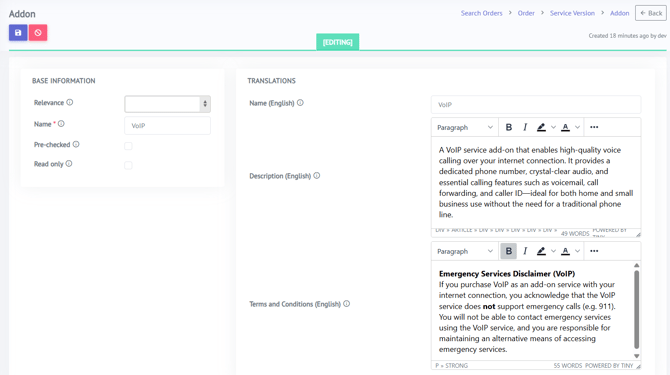
Create a new add-on or edit an existing add-on
-
Enter the required text in the Terms and Conditions field
-
Save the add-on
Once text is present in the Terms and Conditions field, the add-on is considered to have Service Terms, and customer acceptance will be required during checkout.
Summary
Service Terms for add-ons ensure that customers explicitly agree to required contractual conditions before completing an order. By enforcing mandatory acceptance only when applicable, the system supports legal compliance for services such as VoIP while keeping the checkout flow clear, consistent, and customer-friendly.