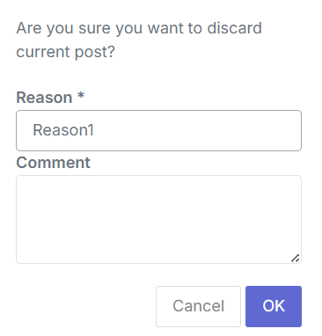
A discard reason is a short label (with an optional comment) that you choose when discarding a record. For example, an order might be discarded because a customer changed their mind, or a survey might be discarded because it was a duplicate. Instead of that context disappearing, it's saved along with the record.
Discard reasons can be set up for one or more entity types — surveys, orders, customers, and others — so the same reason can be reused wherever it's relevant, or you can create different reasons for different situations.
Setting it upDiscard reasons are off by default, so nothing changes until they're turned on.
Setting up discard reasons — creating them, choosing which entity types they apply to, and turning them on — isn't something you configure yourself. To get started, contact your Customer Success manager or COS Support, and let them know:
- Which discard reasons you'd like (for example, "Duplicate", "Customer request")
- Which entity types each reason should apply to, such as Survey, Order, or Customer
- Whether choosing a reason should be optional or required when discarding a record of that type
They'll set this up for you. If you'd like to add, change, or remove reasons later, just reach out again.
Using discard reasonsOnce set up, a reason (and an optional comment) can be selected whenever a record is discarded — whether it's a single record from a list or detail page, or several records discarded together in bulk. If a reason is required, the record can't be discarded until one is chosen.