
Introduction
COS BE provides subscriber billing for companies that do not have a billing system of their own, or who want to offer their customers an additional payment method beyond what their billing system supports. Subscriber billing is currently supported for Single Provider Operators only and is not available in Open Access networks. Payment methods are only utilized if Business Engine subscriber billing is enabled.
Adding a Payment Method
Only credit cards can be registered via the BE Admin interface. ACH is not supported as a payment method in BE Admin.
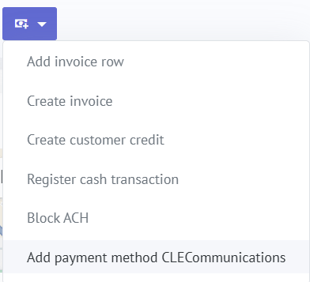
To add a credit card:
- Go to the Customer record
- Press Add payment method in the Billing Action dropdown.
- Insert Card details and Save
Removing a Payment Method
Operators can delete inactive payment cards from a customer's account, provided the card has no linked transactions. Active (default) cards and cards with transaction history cannot be removed.
To remove a payment method:
- Go to the Customer record
- Locate the payment method you wish to remove
- Select Delete — the option will only be available for eligible cards
