
Technical overview
The Partner API is a REST API that sends and receives JSON. It is built for automated workflows such as service provisioning, billing integration and network analysis.
All API timestamps are in UTC. No local time zone or daylight saving adjustments are applied.
Getting started
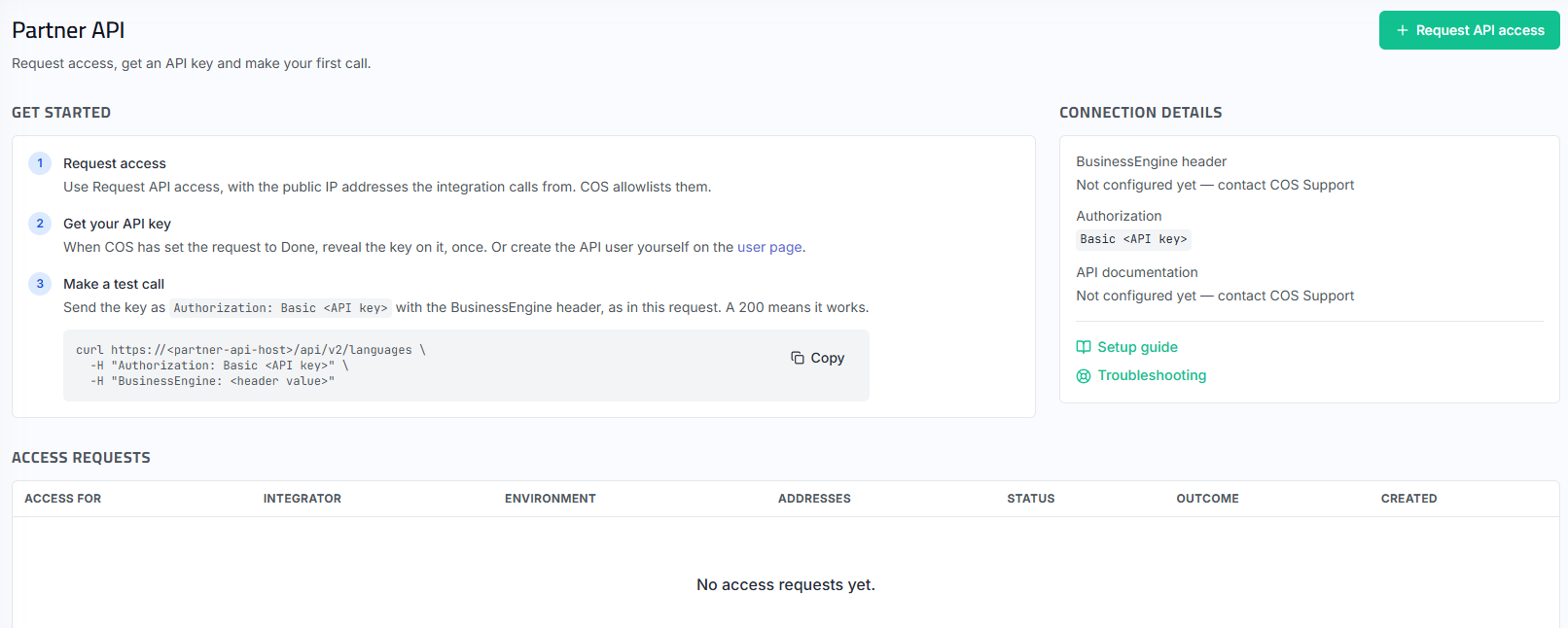
Everything you need to connect an integration is on the Partner API page in Business Engine. To open it, go to Settings → System → Partner API. On the page you can:
- Request API access: submit the public IP addresses your integration calls from. COS adds them to the allowlist.
- Connection details: find your BusinessEngine header value and a link to the API documentation (Swagger).
- Setup guide: follow step-by-step instructions, from requesting access to making your first call.
- Troubleshooting: see what each error code means and how to fix it.
What you can do with the API
The Partner API covers most of Business Engine, grouped into three access areas:
- Service Provider: customers, orders, services, invoices, payments, prospects and tickets.
- Deployment: objects, work orders and areas.
- NOC: network elements, nodes, ports, network contracts, disruptions and tickets.
An API user only reaches the areas it has been granted. Deployment and NOC belong to the network operator and are granted only with its approval.
The complete list of endpoints is in the API documentation (Swagger), which is linked from the Partner API page.
API access issues
If a call fails, start with Troubleshooting on the Partner API page. If your integration will call from new IP addresses, submit a new access request on the page before you switch.
Never send your API key to COS Support or to anyone else. The username is enough.